Noter AI Meeting Notes Summary3.6.6
Publisher Description

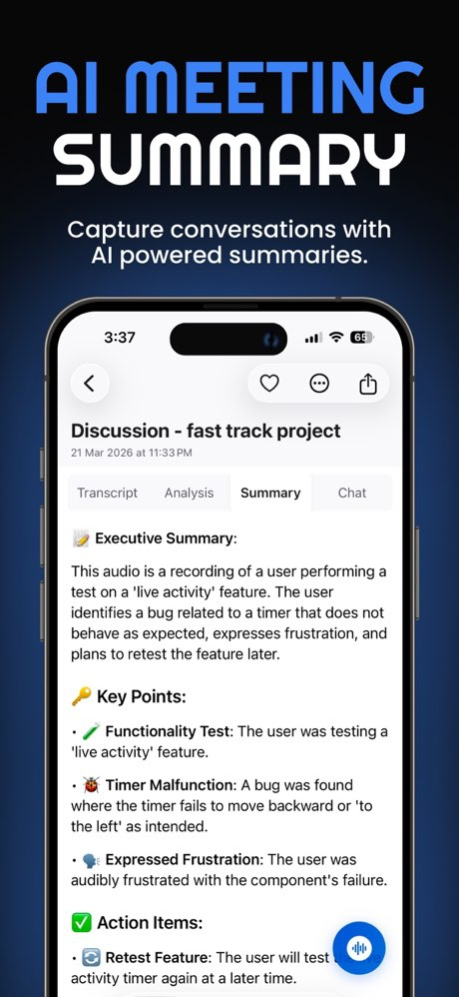


Noter AI records your meetings in person or online, transcribes them in 60+ languages, and turns them into a summary, action items, and notes you can chat with.
It works for real conversations: people talking around a table, lectures, interviews, and calls where people switch between two languages. Language detection is always on, so a meeting that moves between Arabic and English, Hindi and English, or Spanish and English comes back as one transcript.
HOW IT WORKS
. Tap record on your iPhone or iPad, import an audio file, or send the Noter AI bot to your online meeting.
. Within minutes you get a full transcript with speaker labels, an executive summary, detailed analysis, and action items.
. Ask questions about one note or across all your notes, then export to PDF or Word.
RECORD IN PERSON
. One-tap recording for meetings, lectures, interviews, and client visits. No bot and no laptop needed.
. Recording continues in the background while you use other apps.
. Start faster from the Control Center widget or with Siri Shortcuts.
MEETING BOT FOR ONLINE CALLS
. Send the bot to Zoom, Microsoft Teams, Google Meet, or Webex.
. Connect Google Calendar or Outlook and send the bot with one tap.
. Follow the bot's status on the Dynamic Island and Lock Screen.
TRANSCRIPTION IN 60+ LANGUAGES
. Speaker detection and timestamps.
. Mixed-language conversations stay in one transcript.
. Tap any sentence to jump to that moment in the audio.
SUMMARIES, ACTION ITEMS, AND AI CHAT
. Executive summary, key decisions, and action items with owners.
. Get the summary in the spoken language or in one of 12 languages, including English, Arabic, Spanish, French, German, and Hindi.
. AI-generated titles, so you never have to name a note.
TRANSLATION
. Translate any transcript into 46 languages.
. Speaker labels and timestamps stay in place.
IMPORT, EXPORT, AND SHARE
. Import M4A, MP3, WAV, and more from Files, or send audio from any app with the Share Extension.
. Export as PDF, Word (.docx), or plain text, or copy with formatting.
ORGANIZE
. Favorites, tags, and full-text search across every note.
. Cloud sync across your devices.
WHO USES NOTER AI
. Managers and teams: meeting minutes and action items without typing.
. Students: record lectures and get study notes.
. Journalists and researchers: record and transcribe interviews.
. Sales and consultants: client meetings summarized and ready to share.
. Multilingual teams: one transcript for meetings held in two languages.
PLANS
. Start free with short recordings, or try every feature with a free trial.
. One flat subscription per person. No per-seat pricing.
. Monthly and yearly plans. Future features included.
Official website: https://www.noterai.net
Privacy Policy: https://www.noterai.net/privacy
Terms of Use: https://www.apple.com/legal/internet-services/itunes/dev/stdeula/
Version History Minor fixes and performance improvements. 3.6.6 4d ago Bug fixes and performance improvements. 3.6.5 6d ago Bug fixes and performance improvements. 3.6.3 Oct 5 • New Unsent Recordings screen in Settings: any recording that didn't finish uploading or processing now shows up there, so you can repair it and process it again.
• Performance and reliability improvements. 3.6.2 Sep 27 This update fixes a problem that made the app close right after opening on some iPhones and iPads. If Noter AI was closing on launch for you, this update brings it back. Thank you for your patience. 3.6.1 Sep 20 • Name your speakers. Tap a speaker in any transcript and give them a real name. It shows in the transcript, the translation and exports.
• Translation ready alert. Get a notification when a translation finishes. Tap it to open the translation.
• Notifications in your language. Alerts now use the language you picked in the app.
• More room to read. The tab bar shrinks as you scroll.
• Better layout on iPad and Mac, plus bug fixes. 3.6 Sep 18 General improvements and bug fixes. 3.5.4 Sep 12 • Fresh look for notes while they're processing
• Fixed connected calendars showing as disconnected
• Stability improvements 3.5.3 Sep 12 General improvements and enhancements.
Thank you for using Noter AI. 3.5.2 Sep 11 • Folders — organize your notes into folders with custom icons.
• Two themes — Midnight and Graphite, each in light and dark.
• Home Screen & Lock Screen widget — record or open a recent note in one tap.
• Smarter chat — now answers questions about the app itself, too.
• Minor improvements and bug fixes. 3.5.1 Sep 4 Widgets are here. Add Noter AI to your Home Screen or Lock Screen to start recording with one tap and see your latest notes at a glance.
Also in this update:
• Full VoiceOver support across recording, settings, meetings and onboarding
• Keyboard shortcuts on iPad for recording, search and playback
• Reliability improvements to recording and note processing 3.4.9 Sep 3 • Fixed an issue where a notification could wrongly say your upload couldn't be finished while your recording was still uploading in the background
• Improved upload reliability 3.4.8 Aug 15 A few fixes to make everyday recording smoother.
• Tapping stop more than once now saves a single note instead of creating duplicates.
• The Meetings tab now shows only calendar events that actually have a video link. 3.4.7 Aug 14 • Translation issues fixed — plus a new "Translation is ready" notification wherever you are in the app
• Smoother and faster notes list
• Bug fixes and stability improvements 3.4.6 Aug 10 We've made Noter AI more reliable, so your recordings and notes are always saved safely — plus a few improvements to keep everything running smoothly. 3.4.5 Jul 18 Fixed an issue where interrupted uploads could leave recordings stuck processing. 3.4.4 Jul 16 • New "Minutes of Meeting" style — restyle any note into clean, formal meeting minutes
• Restyle improvements, including full Arabic support
• Fixed an issue where a note could get stuck or lose its results while processing
• Fixed "Restore" not bringing back the original summary
• Smoother performance with fewer freezes
• Faster, simpler onboarding 3.4.3 Jul 14 • Fixed: a finished note could keep showing "Processing" in your notes list until you restarted the app — it now updates to done instantly
• More reliable live syncing of your notes
Thanks for using Noter AI! 3.4.2 Jul 6 • Faster, more natural translations
• Smoother scrolling and faster switching between Transcript, Analysis, and Summary
• Fixed jumpy scrolling in long transcripts — tapping a section now takes you right to it
• Get notified the moment your transcript is ready — wherever you are in the app
• Minor improvements and fixes 3.4.1 Jul 3 • Search everything in one place — ask a question right from the home screen and get answers pulled from all your notes at once.
• Restyle your summaries — reshape any note's summary to fit how you work: bullet points, an email, a blog post, meeting notes, or your own custom style. 3.3 Jun 17 Smoother, more reliable note-taking with under-the-hood improvements and fixes. Thanks for using Noter AI! 3.2.2 Jun 9 • New "App features" button on the notes screen — tap anytime to see a quick tour of recording, summaries, AI Chat, translation, and sharing.
• Spanish (Latin America) language now supported.
• Smaller fixes and refinements. 3.2.1 May 25 • Smoother transcription audio sync.
• New Auto-Join bot toggle mode for the meetings list.
• General improvements, enhancements, and bug fixes. 3.2 May 23 Minor Improvement and Bug Fixes 3.1.13 May 12 Minor Improvement and Bug Fixes 3.1.12 May 12
About Noter AI Meeting Notes Summary
The company that develops Noter AI Meeting Notes Summary is Yousef Zuriqi. The latest version released by its developer is 3.6.6.
To install Noter AI Meeting Notes Summary on your iOS device, just click the green Continue To App button above to start the installation process. The app is listed on our website since 2026-10-14 and was downloaded 1 times. We have already checked if the download link is safe, however for your own protection we recommend that you scan the downloaded app with your antivirus. Your antivirus may detect the Noter AI Meeting Notes Summary as malware if the download link is broken.
How to install Noter AI Meeting Notes Summary on your iOS device:
- Click on the Continue To App button on our website. This will redirect you to the App Store.
- Once the Noter AI Meeting Notes Summary is shown in the iTunes listing of your iOS device, you can start its download and installation. Tap on the GET button to the right of the app to start downloading it.
- If you are not logged-in the iOS appstore app, you'll be prompted for your your Apple ID and/or password.
- After Noter AI Meeting Notes Summary is downloaded, you'll see an INSTALL button to the right. Tap on it to start the actual installation of the iOS app.
- Once installation is finished you can tap on the OPEN button to start it. Its icon will also be added to your device home screen.
Program Details
System requirements
Download information
Pricing
Version History
version 3.6.6
posted on 2026-10-14
Version History Minor fixes and performance improvements. 3.6.6 4d ago Bug fixes and performance improvements. 3.6.5 6d ago Bug fixes and performance improvements. 3.6.3 Oct 5 • New Unsent Recordings screen in Settings: any recording that didn't finish uploading or processing now shows up there, so you can repair it and process it again.
• Performance and reliability improvements. 3.6.2 Sep 27 This update fixes a problem that made the app close right after opening on some iPhones and iPads. If Noter AI was closing on launch for you, this update brings it back. Thank you for your patience. 3.6.1 Sep 20 • Name your speakers. Tap a speaker in any transcript and give them a real name. It shows in the transcript, the translation and exports.
• Translation ready alert. Get a notification when a translation finishes. Tap it to open the translation.
• Notifications in your language. Alerts now use the language you picked in the app.
• More room to read. The tab bar shrinks as you scroll.
• Better layout on iPad and Mac, plus bug fixes. 3.6 Sep 18 General improvements and bug fixes. 3.5.4 Sep 12 • Fresh look for notes while they're processing
• Fixed connected calendars showing as disconnected
• Stability improvements 3.5.3 Sep 12 General improvements and enhancements.
Thank you for using Noter AI. 3.5.2 Sep 11 • Folders — organize your notes into folders with custom icons.
• Two themes — Midnight and Graphite, each in light and dark.
• Home Screen & Lock Screen widget — record or open a recent note in one tap.
• Smarter chat — now answers questions about the app itself, too.
• Minor improvements and bug fixes. 3.5.1 Sep 4 Widgets are here. Add Noter AI to your Home Screen or Lock Screen to start recording with one tap and see your latest notes at a glance.
Also in this update:
• Full VoiceOver support across recording, settings, meetings and onboarding
• Keyboard shortcuts on iPad for recording, search and playback
• Reliability improvements to recording and note processing 3.4.9 Sep 3 • Fixed an issue where a notification could wrongly say your upload couldn't be finished while your recording was still uploading in the background
• Improved upload reliability 3.4.8 Aug 15 A few fixes to make everyday recording smoother.
• Tapping stop more than once now saves a single note instead of creating duplicates.
• The Meetings tab now shows only calendar events that actually have a video link. 3.4.7 Aug 14 • Translation issues fixed — plus a new "Translation is ready" notification wherever you are in the app
• Smoother and faster notes list
• Bug fixes and stability improvements 3.4.6 Aug 10 We've made Noter AI more reliable, so your recordings and notes are always saved safely — plus a few improvements to keep everything running smoothly. 3.4.5 Jul 18 Fixed an issue where interrupted uploads could leave recordings stuck processing. 3.4.4 Jul 16 • New "Minutes of Meeting" style — restyle any note into clean, formal meeting minutes
• Restyle improvements, including full Arabic support
• Fixed an issue where a note could get stuck or lose its results while processing
• Fixed "Restore" not bringing back the original summary
• Smoother performance with fewer freezes
• Faster, simpler onboarding 3.4.3 Jul 14 • Fixed: a finished note could keep showing "Processing" in your notes list until you restarted the app — it now updates to done instantly
• More reliable live syncing of your notes
Thanks for using Noter AI! 3.4.2 Jul 6 • Faster, more natural translations
• Smoother scrolling and faster switching between Transcript, Analysis, and Summary
• Fixed jumpy scrolling in long transcripts — tapping a section now takes you right to it
• Get notified the moment your transcript is ready — wherever you are in the app
• Minor improvements and fixes 3.4.1 Jul 3 • Search everything in one place — ask a question right from the home screen and get answers pulled from all your notes at once.
• Restyle your summaries — reshape any note's summary to fit how you work: bullet points, an email, a blog post, meeting notes, or your own custom style. 3.3 Jun 17 Smoother, more reliable note-taking with under-the-hood improvements and fixes. Thanks for using Noter AI! 3.2.2 Jun 9 • New "App features" button on the notes screen — tap anytime to see a quick tour of recording, summaries, AI Chat, translation, and sharing.
• Spanish (Latin America) language now supported.
• Smaller fixes and refinements. 3.2.1 May 25 • Smoother transcription audio sync.
• New Auto-Join bot toggle mode for the meetings list.
• General improvements, enhancements, and bug fixes. 3.2 May 23 Minor Improvement and Bug Fixes 3.1.13 May 12 Minor Improvement and Bug Fixes 3.1.12 May 12
version 3.6.3
posted on 2026-10-07
Version History Bug fixes and performance improvements. 3.6.3 1d ago • New Unsent Recordings screen in Settings: any recording that didn't finish uploading or processing now shows up there, so you can repair it and process it again.
• Performance and reliability improvements. 3.6.2 Sep 27 This update fixes a problem that made the app close right after opening on some iPhones and iPads. If Noter AI was closing on launch for you, this update brings it back. Thank you for your patience. 3.6.1 Sep 20 • Name your speakers. Tap a speaker in any transcript and give them a real name. It shows in the transcript, the translation and exports.
• Translation ready alert. Get a notification when a translation finishes. Tap it to open the translation.
• Notifications in your language. Alerts now use the language you picked in the app.
• More room to read. The tab bar shrinks as you scroll.
• Better layout on iPad and Mac, plus bug fixes. 3.6 Sep 18 General improvements and bug fixes. 3.5.4 Sep 12 • Fresh look for notes while they're processing
• Fixed connected calendars showing as disconnected
• Stability improvements 3.5.3 Sep 12 General improvements and enhancements.
Thank you for using Noter AI. 3.5.2 Sep 11 • Folders — organize your notes into folders with custom icons.
• Two themes — Midnight and Graphite, each in light and dark.
• Home Screen & Lock Screen widget — record or open a recent note in one tap.
• Smarter chat — now answers questions about the app itself, too.
• Minor improvements and bug fixes. 3.5.1 Sep 4 Widgets are here. Add Noter AI to your Home Screen or Lock Screen to start recording with one tap and see your latest notes at a glance.
Also in this update:
• Full VoiceOver support across recording, settings, meetings and onboarding
• Keyboard shortcuts on iPad for recording, search and playback
• Reliability improvements to recording and note processing 3.4.9 Sep 3 • Fixed an issue where a notification could wrongly say your upload couldn't be finished while your recording was still uploading in the background
• Improved upload reliability 3.4.8 Aug 15 A few fixes to make everyday recording smoother.
• Tapping stop more than once now saves a single note instead of creating duplicates.
• The Meetings tab now shows only calendar events that actually have a video link. 3.4.7 Aug 14 • Translation issues fixed — plus a new "Translation is ready" notification wherever you are in the app
• Smoother and faster notes list
• Bug fixes and stability improvements 3.4.6 Aug 10 We've made Noter AI more reliable, so your recordings and notes are always saved safely — plus a few improvements to keep everything running smoothly. 3.4.5 Jul 18 Fixed an issue where interrupted uploads could leave recordings stuck processing. 3.4.4 Jul 16 • New "Minutes of Meeting" style — restyle any note into clean, formal meeting minutes
• Restyle improvements, including full Arabic support
• Fixed an issue where a note could get stuck or lose its results while processing
• Fixed "Restore" not bringing back the original summary
• Smoother performance with fewer freezes
• Faster, simpler onboarding 3.4.3 Jul 14 • Fixed: a finished note could keep showing "Processing" in your notes list until you restarted the app — it now updates to done instantly
• More reliable live syncing of your notes
Thanks for using Noter AI! 3.4.2 Jul 6 • Faster, more natural translations
• Smoother scrolling and faster switching between Transcript, Analysis, and Summary
• Fixed jumpy scrolling in long transcripts — tapping a section now takes you right to it
• Get notified the moment your transcript is ready — wherever you are in the app
• Minor improvements and fixes 3.4.1 Jul 3 • Search everything in one place — ask a question right from the home screen and get answers pulled from all your notes at once.
• Restyle your summaries — reshape any note's summary to fit how you work: bullet points, an email, a blog post, meeting notes, or your own custom style. 3.3 Jun 17 Smoother, more reliable note-taking with under-the-hood improvements and fixes. Thanks for using Noter AI! 3.2.2 Jun 9 • New "App features" button on the notes screen — tap anytime to see a quick tour of recording, summaries, AI Chat, translation, and sharing.
• Spanish (Latin America) language now supported.
• Smaller fixes and refinements. 3.2.1 May 25 • Smoother transcription audio sync.
• New Auto-Join bot toggle mode for the meetings list.
• General improvements, enhancements, and bug fixes. 3.2 May 23 Minor Improvement and Bug Fixes 3.1.13 May 12 Minor Improvement and Bug Fixes 3.1.12 May 12 Minor Improvement and Bug Fixes 3.1.11 May 7 Minor improvements and bug fixes. 3.1.10 May 7
version 3.6.2
posted on 2026-10-03
Version History • New Unsent Recordings screen in Settings: any recording that didn't finish uploading or processing now shows up there, so you can repair it and process it again.
• Performance and reliability improvements. 3.6.2 6d ago This update fixes a problem that made the app close right after opening on some iPhones and iPads. If Noter AI was closing on launch for you, this update brings it back. Thank you for your patience. 3.6.1 Sep 20 • Name your speakers. Tap a speaker in any transcript and give them a real name. It shows in the transcript, the translation and exports.
• Translation ready alert. Get a notification when a translation finishes. Tap it to open the translation.
• Notifications in your language. Alerts now use the language you picked in the app.
• More room to read. The tab bar shrinks as you scroll.
• Better layout on iPad and Mac, plus bug fixes. 3.6 Sep 18 General improvements and bug fixes. 3.5.4 Sep 12 • Fresh look for notes while they're processing
• Fixed connected calendars showing as disconnected
• Stability improvements 3.5.3 Sep 12 General improvements and enhancements.
Thank you for using Noter AI. 3.5.2 Sep 11 • Folders — organize your notes into folders with custom icons.
• Two themes — Midnight and Graphite, each in light and dark.
• Home Screen & Lock Screen widget — record or open a recent note in one tap.
• Smarter chat — now answers questions about the app itself, too.
• Minor improvements and bug fixes. 3.5.1 Sep 4 Widgets are here. Add Noter AI to your Home Screen or Lock Screen to start recording with one tap and see your latest notes at a glance.
Also in this update:
• Full VoiceOver support across recording, settings, meetings and onboarding
• Keyboard shortcuts on iPad for recording, search and playback
• Reliability improvements to recording and note processing 3.4.9 Sep 3 • Fixed an issue where a notification could wrongly say your upload couldn't be finished while your recording was still uploading in the background
• Improved upload reliability 3.4.8 Aug 15 A few fixes to make everyday recording smoother.
• Tapping stop more than once now saves a single note instead of creating duplicates.
• The Meetings tab now shows only calendar events that actually have a video link. 3.4.7 Aug 14 • Translation issues fixed — plus a new "Translation is ready" notification wherever you are in the app
• Smoother and faster notes list
• Bug fixes and stability improvements 3.4.6 Aug 10 We've made Noter AI more reliable, so your recordings and notes are always saved safely — plus a few improvements to keep everything running smoothly. 3.4.5 Jul 18 Fixed an issue where interrupted uploads could leave recordings stuck processing. 3.4.4 Jul 16 • New "Minutes of Meeting" style — restyle any note into clean, formal meeting minutes
• Restyle improvements, including full Arabic support
• Fixed an issue where a note could get stuck or lose its results while processing
• Fixed "Restore" not bringing back the original summary
• Smoother performance with fewer freezes
• Faster, simpler onboarding 3.4.3 Jul 14 • Fixed: a finished note could keep showing "Processing" in your notes list until you restarted the app — it now updates to done instantly
• More reliable live syncing of your notes
Thanks for using Noter AI! 3.4.2 Jul 6 • Faster, more natural translations
• Smoother scrolling and faster switching between Transcript, Analysis, and Summary
• Fixed jumpy scrolling in long transcripts — tapping a section now takes you right to it
• Get notified the moment your transcript is ready — wherever you are in the app
• Minor improvements and fixes 3.4.1 Jul 3 • Search everything in one place — ask a question right from the home screen and get answers pulled from all your notes at once.
• Restyle your summaries — reshape any note's summary to fit how you work: bullet points, an email, a blog post, meeting notes, or your own custom style. 3.3 Jun 17 Smoother, more reliable note-taking with under-the-hood improvements and fixes. Thanks for using Noter AI! 3.2.2 Jun 9 • New "App features" button on the notes screen — tap anytime to see a quick tour of recording, summaries, AI Chat, translation, and sharing.
• Spanish (Latin America) language now supported.
• Smaller fixes and refinements. 3.2.1 May 25 • Smoother transcription audio sync.
• New Auto-Join bot toggle mode for the meetings list.
• General improvements, enhancements, and bug fixes. 3.2 May 23 Minor Improvement and Bug Fixes 3.1.13 May 12 Minor Improvement and Bug Fixes 3.1.12 May 12 Minor Improvement and Bug Fixes 3.1.11 May 7 Minor improvements and bug fixes. 3.1.10 May 7 Minor improvements and bug fixes. 3.1.9 May 3
version 3.6.1
posted on 2026-09-26
Version History This update fixes a problem that made the app close right after opening on some iPhones and iPads. If Noter AI was closing on launch for you, this update brings it back. Thank you for your patience. 3.6.1 5d ago • Name your speakers. Tap a speaker in any transcript and give them a real name. It shows in the transcript, the translation and exports.
• Translation ready alert. Get a notification when a translation finishes. Tap it to open the translation.
• Notifications in your language. Alerts now use the language you picked in the app.
• More room to read. The tab bar shrinks as you scroll.
• Better layout on iPad and Mac, plus bug fixes. 3.6 Sep 18 General improvements and bug fixes. 3.5.4 Sep 12 • Fresh look for notes while they're processing
• Fixed connected calendars showing as disconnected
• Stability improvements 3.5.3 Sep 12 General improvements and enhancements.
Thank you for using Noter AI. 3.5.2 Sep 11 • Folders — organize your notes into folders with custom icons.
• Two themes — Midnight and Graphite, each in light and dark.
• Home Screen & Lock Screen widget — record or open a recent note in one tap.
• Smarter chat — now answers questions about the app itself, too.
• Minor improvements and bug fixes. 3.5.1 Sep 4 Widgets are here. Add Noter AI to your Home Screen or Lock Screen to start recording with one tap and see your latest notes at a glance.
Also in this update:
• Full VoiceOver support across recording, settings, meetings and onboarding
• Keyboard shortcuts on iPad for recording, search and playback
• Reliability improvements to recording and note processing 3.4.9 Sep 3 • Fixed an issue where a notification could wrongly say your upload couldn't be finished while your recording was still uploading in the background
• Improved upload reliability 3.4.8 Aug 15 A few fixes to make everyday recording smoother.
• Tapping stop more than once now saves a single note instead of creating duplicates.
• The Meetings tab now shows only calendar events that actually have a video link. 3.4.7 Aug 14 • Translation issues fixed — plus a new "Translation is ready" notification wherever you are in the app
• Smoother and faster notes list
• Bug fixes and stability improvements 3.4.6 Aug 10 We've made Noter AI more reliable, so your recordings and notes are always saved safely — plus a few improvements to keep everything running smoothly. 3.4.5 Jul 18 Fixed an issue where interrupted uploads could leave recordings stuck processing. 3.4.4 Jul 16 • New "Minutes of Meeting" style — restyle any note into clean, formal meeting minutes
• Restyle improvements, including full Arabic support
• Fixed an issue where a note could get stuck or lose its results while processing
• Fixed "Restore" not bringing back the original summary
• Smoother performance with fewer freezes
• Faster, simpler onboarding 3.4.3 Jul 14 • Fixed: a finished note could keep showing "Processing" in your notes list until you restarted the app — it now updates to done instantly
• More reliable live syncing of your notes
Thanks for using Noter AI! 3.4.2 Jul 6 • Faster, more natural translations
• Smoother scrolling and faster switching between Transcript, Analysis, and Summary
• Fixed jumpy scrolling in long transcripts — tapping a section now takes you right to it
• Get notified the moment your transcript is ready — wherever you are in the app
• Minor improvements and fixes 3.4.1 Jul 3 • Search everything in one place — ask a question right from the home screen and get answers pulled from all your notes at once.
• Restyle your summaries — reshape any note's summary to fit how you work: bullet points, an email, a blog post, meeting notes, or your own custom style. 3.3 Jun 17 Smoother, more reliable note-taking with under-the-hood improvements and fixes. Thanks for using Noter AI! 3.2.2 Jun 9 • New "App features" button on the notes screen — tap anytime to see a quick tour of recording, summaries, AI Chat, translation, and sharing.
• Spanish (Latin America) language now supported.
• Smaller fixes and refinements. 3.2.1 May 25 • Smoother transcription audio sync.
• New Auto-Join bot toggle mode for the meetings list.
• General improvements, enhancements, and bug fixes. 3.2 May 23 Minor Improvement and Bug Fixes 3.1.13 May 12 Minor Improvement and Bug Fixes 3.1.12 May 12 Minor Improvement and Bug Fixes 3.1.11 May 7 Minor improvements and bug fixes. 3.1.10 May 7 Minor improvements and bug fixes. 3.1.9 May 3 - Added support for medium-sized notes.
- General improvements and bug fixes. 3.1.8 Apr 30
version 3.6
posted on 2026-09-19
Version History • Name your speakers. Tap a speaker in any transcript and give them a real name. It shows in the transcript, the translation and exports.
• Translation ready alert. Get a notification when a translation finishes. Tap it to open the translation.
• Notifications in your language. Alerts now use the language you picked in the app.
• More room to read. The tab bar shrinks as you scroll.
• Better layout on iPad and Mac, plus bug fixes. 3.6 16h ago General improvements and bug fixes. 3.5.4 6d ago • Fresh look for notes while they're processing
• Fixed connected calendars showing as disconnected
• Stability improvements 3.5.3 Sep 12 General improvements and enhancements.
Thank you for using Noter AI. 3.5.2 Sep 11 • Folders — organize your notes into folders with custom icons.
• Two themes — Midnight and Graphite, each in light and dark.
• Home Screen & Lock Screen widget — record or open a recent note in one tap.
• Smarter chat — now answers questions about the app itself, too.
• Minor improvements and bug fixes. 3.5.1 Sep 4 Widgets are here. Add Noter AI to your Home Screen or Lock Screen to start recording with one tap and see your latest notes at a glance.
Also in this update:
• Full VoiceOver support across recording, settings, meetings and onboarding
• Keyboard shortcuts on iPad for recording, search and playback
• Reliability improvements to recording and note processing 3.4.9 Sep 3 • Fixed an issue where a notification could wrongly say your upload couldn't be finished while your recording was still uploading in the background
• Improved upload reliability 3.4.8 Aug 15 A few fixes to make everyday recording smoother.
• Tapping stop more than once now saves a single note instead of creating duplicates.
• The Meetings tab now shows only calendar events that actually have a video link. 3.4.7 Aug 14 • Translation issues fixed — plus a new "Translation is ready" notification wherever you are in the app
• Smoother and faster notes list
• Bug fixes and stability improvements 3.4.6 Aug 10 We've made Noter AI more reliable, so your recordings and notes are always saved safely — plus a few improvements to keep everything running smoothly. 3.4.5 Jul 18 Fixed an issue where interrupted uploads could leave recordings stuck processing. 3.4.4 Jul 16 • New "Minutes of Meeting" style — restyle any note into clean, formal meeting minutes
• Restyle improvements, including full Arabic support
• Fixed an issue where a note could get stuck or lose its results while processing
• Fixed "Restore" not bringing back the original summary
• Smoother performance with fewer freezes
• Faster, simpler onboarding 3.4.3 Jul 14 • Fixed: a finished note could keep showing "Processing" in your notes list until you restarted the app — it now updates to done instantly
• More reliable live syncing of your notes
Thanks for using Noter AI! 3.4.2 Jul 6 • Faster, more natural translations
• Smoother scrolling and faster switching between Transcript, Analysis, and Summary
• Fixed jumpy scrolling in long transcripts — tapping a section now takes you right to it
• Get notified the moment your transcript is ready — wherever you are in the app
• Minor improvements and fixes 3.4.1 Jul 3 • Search everything in one place — ask a question right from the home screen and get answers pulled from all your notes at once.
• Restyle your summaries — reshape any note's summary to fit how you work: bullet points, an email, a blog post, meeting notes, or your own custom style. 3.3 Jun 17 Smoother, more reliable note-taking with under-the-hood improvements and fixes. Thanks for using Noter AI! 3.2.2 Jun 9 • New "App features" button on the notes screen — tap anytime to see a quick tour of recording, summaries, AI Chat, translation, and sharing.
• Spanish (Latin America) language now supported.
• Smaller fixes and refinements. 3.2.1 May 25 • Smoother transcription audio sync.
• New Auto-Join bot toggle mode for the meetings list.
• General improvements, enhancements, and bug fixes. 3.2 May 23 Minor Improvement and Bug Fixes 3.1.13 May 12 Minor Improvement and Bug Fixes 3.1.12 May 12 Minor Improvement and Bug Fixes 3.1.11 May 7 Minor improvements and bug fixes. 3.1.10 May 7 Minor improvements and bug fixes. 3.1.9 May 3 - Added support for medium-sized notes.
- General improvements and bug fixes. 3.1.8 Apr 30 - Fixed an issue where completed recordings could still show a processing failure message.
- Performance improvements and minor bug fixes. 3.1.7 Apr 25
version 3.5.1
posted on 2026-09-10
Version History • Folders — organize your notes into folders with custom icons.
• Two themes — Midnight and Graphite, each in light and dark.
• Home Screen & Lock Screen widget — record or open a recent note in one tap.
• Smarter chat — now answers questions about the app itself, too.
• Minor improvements and bug fixes. 3.5.1 5d ago Widgets are here. Add Noter AI to your Home Screen or Lock Screen to start recording with one tap and see your latest notes at a glance.
Also in this update:
• Full VoiceOver support across recording, settings, meetings and onboarding
• Keyboard shortcuts on iPad for recording, search and playback
• Reliability improvements to recording and note processing 3.4.9 6d ago • Fixed an issue where a notification could wrongly say your upload couldn't be finished while your recording was still uploading in the background
• Improved upload reliability 3.4.8 Aug 15 A few fixes to make everyday recording smoother.
• Tapping stop more than once now saves a single note instead of creating duplicates.
• The Meetings tab now shows only calendar events that actually have a video link. 3.4.7 Aug 14 • Translation issues fixed — plus a new "Translation is ready" notification wherever you are in the app
• Smoother and faster notes list
• Bug fixes and stability improvements 3.4.6 Aug 10 We've made Noter AI more reliable, so your recordings and notes are always saved safely — plus a few improvements to keep everything running smoothly. 3.4.5 Jul 18 Fixed an issue where interrupted uploads could leave recordings stuck processing. 3.4.4 Jul 16 • New "Minutes of Meeting" style — restyle any note into clean, formal meeting minutes
• Restyle improvements, including full Arabic support
• Fixed an issue where a note could get stuck or lose its results while processing
• Fixed "Restore" not bringing back the original summary
• Smoother performance with fewer freezes
• Faster, simpler onboarding 3.4.3 Jul 14 • Fixed: a finished note could keep showing "Processing" in your notes list until you restarted the app — it now updates to done instantly
• More reliable live syncing of your notes
Thanks for using Noter AI! 3.4.2 Jul 6 • Faster, more natural translations
• Smoother scrolling and faster switching between Transcript, Analysis, and Summary
• Fixed jumpy scrolling in long transcripts — tapping a section now takes you right to it
• Get notified the moment your transcript is ready — wherever you are in the app
• Minor improvements and fixes 3.4.1 Jul 3 • Search everything in one place — ask a question right from the home screen and get answers pulled from all your notes at once.
• Restyle your summaries — reshape any note's summary to fit how you work: bullet points, an email, a blog post, meeting notes, or your own custom style. 3.3 Jun 17 Smoother, more reliable note-taking with under-the-hood improvements and fixes. Thanks for using Noter AI! 3.2.2 Jun 9 • New "App features" button on the notes screen — tap anytime to see a quick tour of recording, summaries, AI Chat, translation, and sharing.
• Spanish (Latin America) language now supported.
• Smaller fixes and refinements. 3.2.1 May 25 • Smoother transcription audio sync.
• New Auto-Join bot toggle mode for the meetings list.
• General improvements, enhancements, and bug fixes. 3.2 May 23 Minor Improvement and Bug Fixes 3.1.13 May 12 Minor Improvement and Bug Fixes 3.1.12 May 12 Minor Improvement and Bug Fixes 3.1.11 May 7 Minor improvements and bug fixes. 3.1.10 May 7 Minor improvements and bug fixes. 3.1.9 May 3 - Added support for medium-sized notes.
- General improvements and bug fixes. 3.1.8 Apr 30 - Fixed an issue where completed recordings could still show a processing failure message.
- Performance improvements and minor bug fixes. 3.1.7 Apr 25 - Peformance improvements
- Minor Bug fixes. 3.1.6 Apr 22 - Peformance improvements
- Minor Bug fixes. 3.1.5 Apr 19 - Fix issue where notes scrolling is slow while recording. 3.1.4 Apr 9 - General performance improvement 3.1.3 Apr 3
version 3.4.8
posted on 2026-09-03
Version History • Fixed an issue where a notification could wrongly say your upload couldn't be finished while your recording was still uploading in the background
• Improved upload reliability 3.4.8 Aug 15 A few fixes to make everyday recording smoother.
• Tapping stop more than once now saves a single note instead of creating duplicates.
• The Meetings tab now shows only calendar events that actually have a video link. 3.4.7 Aug 14 • Translation issues fixed — plus a new "Translation is ready" notification wherever you are in the app
• Smoother and faster notes list
• Bug fixes and stability improvements 3.4.6 Aug 10 We've made Noter AI more reliable, so your recordings and notes are always saved safely — plus a few improvements to keep everything running smoothly. 3.4.5 Jul 18 Fixed an issue where interrupted uploads could leave recordings stuck processing. 3.4.4 Jul 16 • New "Minutes of Meeting" style — restyle any note into clean, formal meeting minutes
• Restyle improvements, including full Arabic support
• Fixed an issue where a note could get stuck or lose its results while processing
• Fixed "Restore" not bringing back the original summary
• Smoother performance with fewer freezes
• Faster, simpler onboarding 3.4.3 Jul 14 • Fixed: a finished note could keep showing "Processing" in your notes list until you restarted the app — it now updates to done instantly
• More reliable live syncing of your notes
Thanks for using Noter AI! 3.4.2 Jul 6 • Faster, more natural translations
• Smoother scrolling and faster switching between Transcript, Analysis, and Summary
• Fixed jumpy scrolling in long transcripts — tapping a section now takes you right to it
• Get notified the moment your transcript is ready — wherever you are in the app
• Minor improvements and fixes 3.4.1 Jul 3 • Search everything in one place — ask a question right from the home screen and get answers pulled from all your notes at once.
• Restyle your summaries — reshape any note's summary to fit how you work: bullet points, an email, a blog post, meeting notes, or your own custom style. 3.3 Jun 17 Smoother, more reliable note-taking with under-the-hood improvements and fixes. Thanks for using Noter AI! 3.2.2 Jun 9 • New "App features" button on the notes screen — tap anytime to see a quick tour of recording, summaries, AI Chat, translation, and sharing.
• Spanish (Latin America) language now supported.
• Smaller fixes and refinements. 3.2.1 May 25 • Smoother transcription audio sync.
• New Auto-Join bot toggle mode for the meetings list.
• General improvements, enhancements, and bug fixes. 3.2 May 23 Minor Improvement and Bug Fixes 3.1.13 May 12 Minor Improvement and Bug Fixes 3.1.12 May 12 Minor Improvement and Bug Fixes 3.1.11 May 7 Minor improvements and bug fixes. 3.1.10 May 7 Minor improvements and bug fixes. 3.1.9 May 3 - Added support for medium-sized notes.
- General improvements and bug fixes. 3.1.8 Apr 30 - Fixed an issue where completed recordings could still show a processing failure message.
- Performance improvements and minor bug fixes. 3.1.7 Apr 25 - Peformance improvements
- Minor Bug fixes. 3.1.6 Apr 22 - Peformance improvements
- Minor Bug fixes. 3.1.5 Apr 19 - Fix issue where notes scrolling is slow while recording. 3.1.4 Apr 9 - General performance improvement 3.1.3 Apr 3 - General performance improvement 3.1.2 Apr 2 - General Peformance improvement 3.1.1 Apr 1
version 3.4.6
posted on 2026-08-12
Version History • Translation issues fixed — plus a new "Translation is ready" notification wherever you are in the app
• Smoother and faster notes list
• Bug fixes and stability improvements 3.4.6 2d ago We've made Noter AI more reliable, so your recordings and notes are always saved safely — plus a few improvements to keep everything running smoothly. 3.4.5 Jul 18 Fixed an issue where interrupted uploads could leave recordings stuck processing. 3.4.4 Jul 16 • New "Minutes of Meeting" style — restyle any note into clean, formal meeting minutes
• Restyle improvements, including full Arabic support
• Fixed an issue where a note could get stuck or lose its results while processing
• Fixed "Restore" not bringing back the original summary
• Smoother performance with fewer freezes
• Faster, simpler onboarding 3.4.3 Jul 14 • Fixed: a finished note could keep showing "Processing" in your notes list until you restarted the app — it now updates to done instantly
• More reliable live syncing of your notes
Thanks for using Noter AI! 3.4.2 Jul 6 • Faster, more natural translations
• Smoother scrolling and faster switching between Transcript, Analysis, and Summary
• Fixed jumpy scrolling in long transcripts — tapping a section now takes you right to it
• Get notified the moment your transcript is ready — wherever you are in the app
• Minor improvements and fixes 3.4.1 Jul 3 • Search everything in one place — ask a question right from the home screen and get answers pulled from all your notes at once.
• Restyle your summaries — reshape any note's summary to fit how you work: bullet points, an email, a blog post, meeting notes, or your own custom style. 3.3 Jun 17 Smoother, more reliable note-taking with under-the-hood improvements and fixes. Thanks for using Noter AI! 3.2.2 Jun 9 • New "App features" button on the notes screen — tap anytime to see a quick tour of recording, summaries, AI Chat, translation, and sharing.
• Spanish (Latin America) language now supported.
• Smaller fixes and refinements. 3.2.1 May 25 • Smoother transcription audio sync.
• New Auto-Join bot toggle mode for the meetings list.
• General improvements, enhancements, and bug fixes. 3.2 May 23 Minor Improvement and Bug Fixes 3.1.13 May 12 Minor Improvement and Bug Fixes 3.1.12 May 12 Minor Improvement and Bug Fixes 3.1.11 May 7 Minor improvements and bug fixes. 3.1.10 May 7 Minor improvements and bug fixes. 3.1.9 May 3 - Added support for medium-sized notes.
- General improvements and bug fixes. 3.1.8 Apr 30 - Fixed an issue where completed recordings could still show a processing failure message.
- Performance improvements and minor bug fixes. 3.1.7 Apr 25 - Peformance improvements
- Minor Bug fixes. 3.1.6 Apr 22 - Peformance improvements
- Minor Bug fixes. 3.1.5 Apr 19 - Fix issue where notes scrolling is slow while recording. 3.1.4 Apr 9 - General performance improvement 3.1.3 Apr 3 - General performance improvement 3.1.2 Apr 2 - General Peformance improvement 3.1.1 Apr 1 Noter AI 3.1 — Major Update
NEW: AI Meeting Bot
• Send the Noter AI bot to join your online meetings on Zoom, Microsoft Teams, Google Meet, and Webex. It records,
transcribes, and summarizes automatically.
NEW: Calendar Integration
• Connect Google Calendar or Outlook Calendar. See upcoming meetings and send the bot with one tap.
IMPROVED: AI Chat
• Faster, more accurate answers when chatting with your notes.
IMPROVED: AI Analysis
• Faster processing with improved accuracy for transcription, summaries, and action items.
REDESIGNED
• Fresh new design throughout the app.
Plus general improvements and bug fixes. 3.1 Mar 30 Noter AI 3.0 — Major Update
NEW: AI Meeting Bot
• Send the Noter AI bot to join your online meetings on Zoom, Microsoft Teams, Google Meet, and Webex. It records,
transcribes, and summarizes automatically.
NEW: Calendar Integration
• Connect Google Calendar or Outlook Calendar. See upcoming meetings and send the bot with one tap.
IMPROVED: AI Chat
• Faster, more accurate answers when chatting with your notes.
IMPROVED: AI Analysis
• Faster processing with improved accuracy for transcription, summaries, and action items.
REDESIGNED
• Fresh new design throughout the app.
Plus general improvements and bug fixes. 3.0 Mar 26
version 3.4.5
posted on 2026-07-23
Version History We've made Noter AI more reliable, so your recordings and notes are always saved safely — plus a few improvements to keep everything running smoothly. 3.4.5 5d ago Fixed an issue where interrupted uploads could leave recordings stuck processing. 3.4.4 6d ago • New "Minutes of Meeting" style — restyle any note into clean, formal meeting minutes
• Restyle improvements, including full Arabic support
• Fixed an issue where a note could get stuck or lose its results while processing
• Fixed "Restore" not bringing back the original summary
• Smoother performance with fewer freezes
• Faster, simpler onboarding 3.4.3 Jul 14 • Fixed: a finished note could keep showing "Processing" in your notes list until you restarted the app — it now updates to done instantly
• More reliable live syncing of your notes
Thanks for using Noter AI! 3.4.2 Jul 6 • Faster, more natural translations
• Smoother scrolling and faster switching between Transcript, Analysis, and Summary
• Fixed jumpy scrolling in long transcripts — tapping a section now takes you right to it
• Get notified the moment your transcript is ready — wherever you are in the app
• Minor improvements and fixes 3.4.1 Jul 3 • Search everything in one place — ask a question right from the home screen and get answers pulled from all your notes at once.
• Restyle your summaries — reshape any note's summary to fit how you work: bullet points, an email, a blog post, meeting notes, or your own custom style. 3.3 Jun 17 Smoother, more reliable note-taking with under-the-hood improvements and fixes. Thanks for using Noter AI! 3.2.2 Jun 9 • New "App features" button on the notes screen — tap anytime to see a quick tour of recording, summaries, AI Chat, translation, and sharing.
• Spanish (Latin America) language now supported.
• Smaller fixes and refinements. 3.2.1 May 25 • Smoother transcription audio sync.
• New Auto-Join bot toggle mode for the meetings list.
• General improvements, enhancements, and bug fixes. 3.2 May 23 Minor Improvement and Bug Fixes 3.1.13 May 12 Minor Improvement and Bug Fixes 3.1.12 May 12 Minor Improvement and Bug Fixes 3.1.11 May 7 Minor improvements and bug fixes. 3.1.10 May 7 Minor improvements and bug fixes. 3.1.9 May 3 - Added support for medium-sized notes.
- General improvements and bug fixes. 3.1.8 Apr 30 - Fixed an issue where completed recordings could still show a processing failure message.
- Performance improvements and minor bug fixes. 3.1.7 Apr 25 - Peformance improvements
- Minor Bug fixes. 3.1.6 Apr 22 - Peformance improvements
- Minor Bug fixes. 3.1.5 Apr 19 - Fix issue where notes scrolling is slow while recording. 3.1.4 Apr 9 - General performance improvement 3.1.3 Apr 3 - General performance improvement 3.1.2 Apr 2 - General Peformance improvement 3.1.1 Apr 1 Noter AI 3.1 — Major Update
NEW: AI Meeting Bot
• Send the Noter AI bot to join your online meetings on Zoom, Microsoft Teams, Google Meet, and Webex. It records,
transcribes, and summarizes automatically.
NEW: Calendar Integration
• Connect Google Calendar or Outlook Calendar. See upcoming meetings and send the bot with one tap.
IMPROVED: AI Chat
• Faster, more accurate answers when chatting with your notes.
IMPROVED: AI Analysis
• Faster processing with improved accuracy for transcription, summaries, and action items.
REDESIGNED
• Fresh new design throughout the app.
Plus general improvements and bug fixes. 3.1 Mar 30 Noter AI 3.0 — Major Update
NEW: AI Meeting Bot
• Send the Noter AI bot to join your online meetings on Zoom, Microsoft Teams, Google Meet, and Webex. It records,
transcribes, and summarizes automatically.
NEW: Calendar Integration
• Connect Google Calendar or Outlook Calendar. See upcoming meetings and send the bot with one tap.
IMPROVED: AI Chat
• Faster, more accurate answers when chatting with your notes.
IMPROVED: AI Analysis
• Faster processing with improved accuracy for transcription, summaries, and action items.
REDESIGNED
• Fresh new design throughout the app.
Plus general improvements and bug fixes. 3.0 Mar 26 - Now you can search and check other notes while recording
- Add live activity at background so you keep up with note process
- UI enhancement and performance improvement 2.2 Mar 12
version 3.3
posted on 2026-07-02
Version History • Search everything in one place — ask a question right from the home screen and get answers pulled from all your notes at once.
• Restyle your summaries — reshape any note's summary to fit how you work: bullet points, an email, a blog post, meeting notes, or your own custom style. 3.3 Jun 17 Smoother, more reliable note-taking with under-the-hood improvements and fixes. Thanks for using Noter AI! 3.2.2 Jun 9 • New "App features" button on the notes screen — tap anytime to see a quick tour of recording, summaries, AI Chat, translation, and sharing.
• Spanish (Latin America) language now supported.
• Smaller fixes and refinements. 3.2.1 May 25 • Smoother transcription audio sync.
• New Auto-Join bot toggle mode for the meetings list.
• General improvements, enhancements, and bug fixes. 3.2 May 23 Minor Improvement and Bug Fixes 3.1.13 May 12 Minor Improvement and Bug Fixes 3.1.12 May 12 Minor Improvement and Bug Fixes 3.1.11 May 7 Minor improvements and bug fixes. 3.1.10 May 7 Minor improvements and bug fixes. 3.1.9 May 3 - Added support for medium-sized notes.
- General improvements and bug fixes. 3.1.8 Apr 30 - Fixed an issue where completed recordings could still show a processing failure message.
- Performance improvements and minor bug fixes. 3.1.7 Apr 25 - Peformance improvements
- Minor Bug fixes. 3.1.6 Apr 22 - Peformance improvements
- Minor Bug fixes. 3.1.5 Apr 19 - Fix issue where notes scrolling is slow while recording. 3.1.4 Apr 9 - General performance improvement 3.1.3 Apr 3 - General performance improvement 3.1.2 Apr 2 - General Peformance improvement 3.1.1 Apr 1 Noter AI 3.1 — Major Update
NEW: AI Meeting Bot
• Send the Noter AI bot to join your online meetings on Zoom, Microsoft Teams, Google Meet, and Webex. It records,
transcribes, and summarizes automatically.
NEW: Calendar Integration
• Connect Google Calendar or Outlook Calendar. See upcoming meetings and send the bot with one tap.
IMPROVED: AI Chat
• Faster, more accurate answers when chatting with your notes.
IMPROVED: AI Analysis
• Faster processing with improved accuracy for transcription, summaries, and action items.
REDESIGNED
• Fresh new design throughout the app.
Plus general improvements and bug fixes. 3.1 Mar 30 Noter AI 3.0 — Major Update
NEW: AI Meeting Bot
• Send the Noter AI bot to join your online meetings on Zoom, Microsoft Teams, Google Meet, and Webex. It records,
transcribes, and summarizes automatically.
NEW: Calendar Integration
• Connect Google Calendar or Outlook Calendar. See upcoming meetings and send the bot with one tap.
IMPROVED: AI Chat
• Faster, more accurate answers when chatting with your notes.
IMPROVED: AI Analysis
• Faster processing with improved accuracy for transcription, summaries, and action items.
REDESIGNED
• Fresh new design throughout the app.
Plus general improvements and bug fixes. 3.0 Mar 26 - Now you can search and check other notes while recording
- Add live activity at background so you keep up with note process
- UI enhancement and performance improvement 2.2 Mar 12 - General enhancement and process improvement 2.1.2 Mar 7 - Faster loading and app start-up
- Performance improvement and bug fixes 2.1.1 Feb 19 - Adding toggle to record button in control center for fast access.
- You can now share your audio file from any app to Noter AI for immediate processing.
- General Performance improvement. 2.1 Feb 15 - New iPad version for Noter AI
- Improved translation engine for notes transcriptions
- General enhancement 2.0 Feb 7 - More accurate transcription
- General performance improvement 1.8.2 Jan 29
